


How can Album help you?
- learn which problem Album solves
- learn what working with Album looks like
- learn how Album makes solutions reproducible and findable
- learn how LLM agents can use Album
- have a glance into the technical concepts [optional]
Motivation
Scientific imaging methods appear faster than anyone can install, configure and combine them. The method from a paper you just read needs its own Python version, a GPU library, a Java tool or a model download - and the next method needs different ones. At the same time, LLM agents are asked to put together analyses that they cannot reliably run.
When researchers develop and use software together, the same tasks come back again and again: find, try and reproduce existing routines, adapt and test them for a new use case, share them with collaborators and run them on more data, and finally package them so that others can still run them years later.
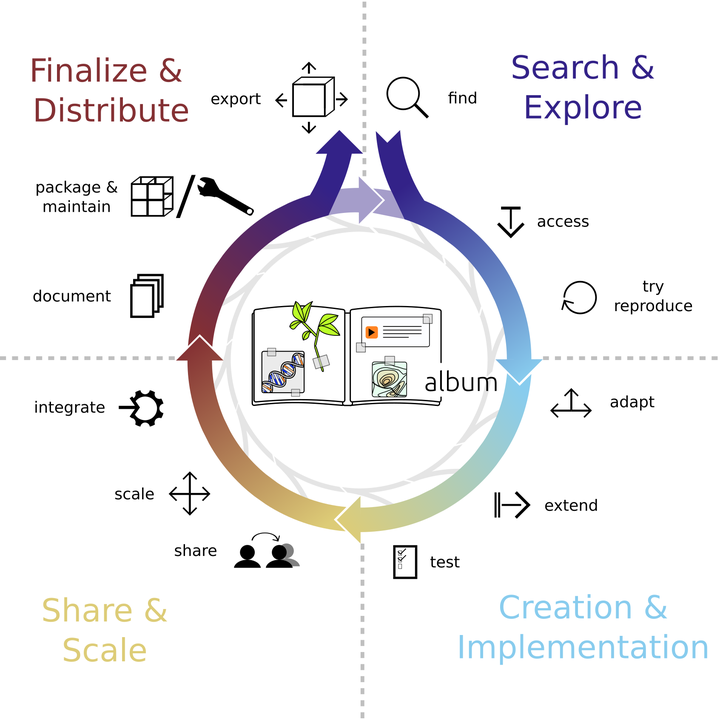
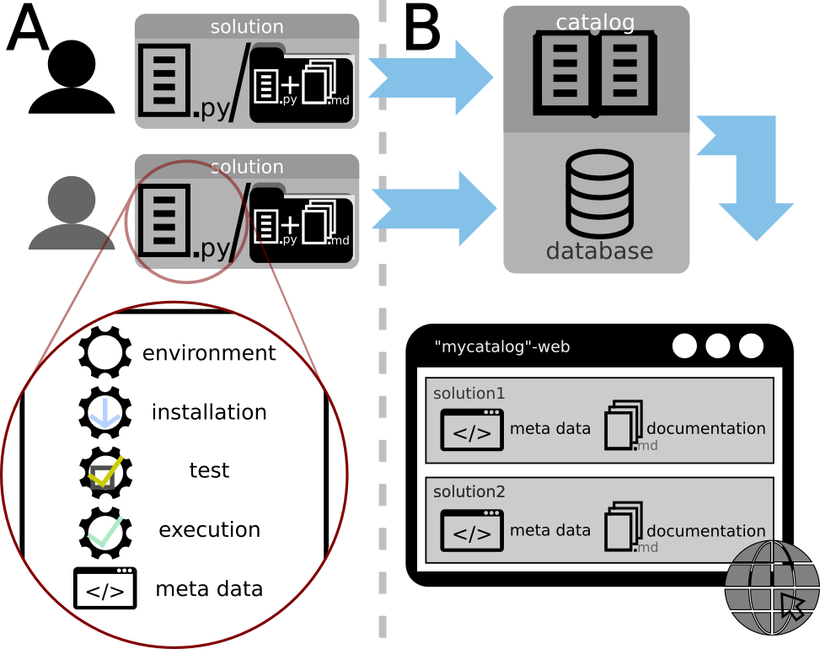
Album supports this cycle with two building blocks: the solution, a routine that you can run, packaged in a single Python file, and the catalog, a collection of solutions that you share with others.
What does it look like to use Album in practice?
A solution bundles everything a routine needs (see A): its software environment, an optional install step (for example downloading a model), the code that runs it, a test, its arguments and what to cite. Catalogs collect solutions and can show them on a website (see B).
Each phase of the cycle is a short command:
- Find and try a solution:
album install,album info,album run - Adapt it to your problem:
album clone - Check that it works:
album test - Share it:
album deployto a catalog - Scale it, for example to many files at once:
album run-distributed¹ - Make it last, for example as a container image:
album docker¹
¹ from a plugin: album-distributed, album-docker
You would use Album to run your daily routines, to write solutions for them, to share them with your lab or the whole community, and to update them when your methods change.
Album also takes care of reproducibility: every solution brings the software environment it was written and tested with. Why does that matter?
Why should we care about reproducibility?
Imagine you run these lines of Python code:
import matplotlib.pyplot as plt
import numpy as np
from skimage.transform import rotate

image = np.ones((20, 20))
image[5:-5, 5:-5] = 2

fig, axs = plt.subplots(1, 6, figsize=(13, 2))

for i in range(6):
    axs[i].set_title(f'order={i}')
    axs[i].imshow(rotate(image, 30, order=i, cval=0, resize=True, clip=True), vmin=0, vmax=3)

plt.show()
You look at the result and see this:

Someone else runs exactly the same code - and sees this:

What happened? The code ran with different versions of scikit-image. Nothing in the code says which versions it needs, so a bug in one version changed the result. This is not rare, and sometimes the difference is drastic.
This is why a solution brings its own environment: it pins the versions the solution was written and tested with, and solutions with conflicting dependencies run side by side on the same computer. When you deploy a solution to a catalog, Album also writes a lock file with the exact packages for each platform, and container images and DOIs keep it runnable for the long term. This does not make every result reproducible on its own, but it makes an analysis easy to re-run, inspect and compare.
How do we make solutions findable?
Solutions live in catalogs. A catalog is a git repository - on GitLab, GitHub, a network drive or your own computer - with an index of its solutions. Anyone can create one: a lab, an institute or a community. Album collects the catalogs you add and searches all of them:
album search segmentation
Catalogs on GitLab or GitHub can have a website with the description, arguments, documentation and citations of every solution - have a look at the Helmholtz Imaging catalog. The public catalogs are listed on the start page.
How does Album work with LLM agents?
Large language models (LLMs) write analysis code and are asked to put together whole workflows. Album gives them building blocks that actually run:
- Writing solutions. A solution is a single Python file with a fixed structure, so an LLM can draft one from a
description.
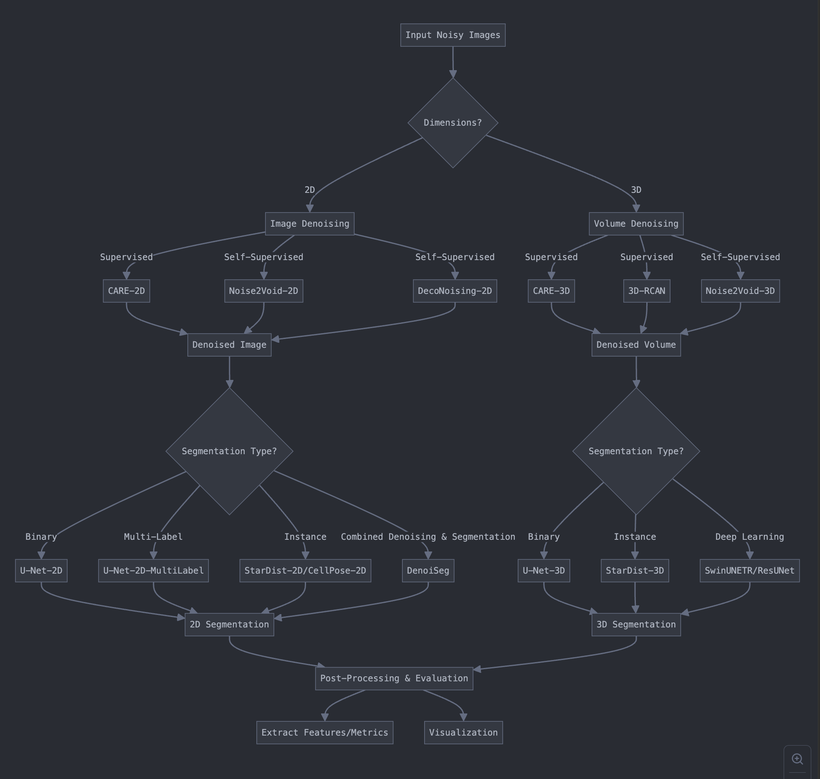
album testthen checks the draft before anyone relies on it. The Album documentation has a prompt for this. - Running solutions. With Album MCP, an agent such as Claude lists your catalogs, searches them, reads the arguments of a solution, installs it and runs it. It can only choose solutions that exist in your catalogs, so every step of its analysis is a tested, versioned solution instead of a command it made up.
- What comes next. Agents that compose solutions into complete workflows: your catalogs become the inventory from which an agent assembles an analysis, and the result can be re-run like any other solution.
Solutions run with your permissions. Add catalogs you trust, and check what an agent is about to run.
Where has Album been used?
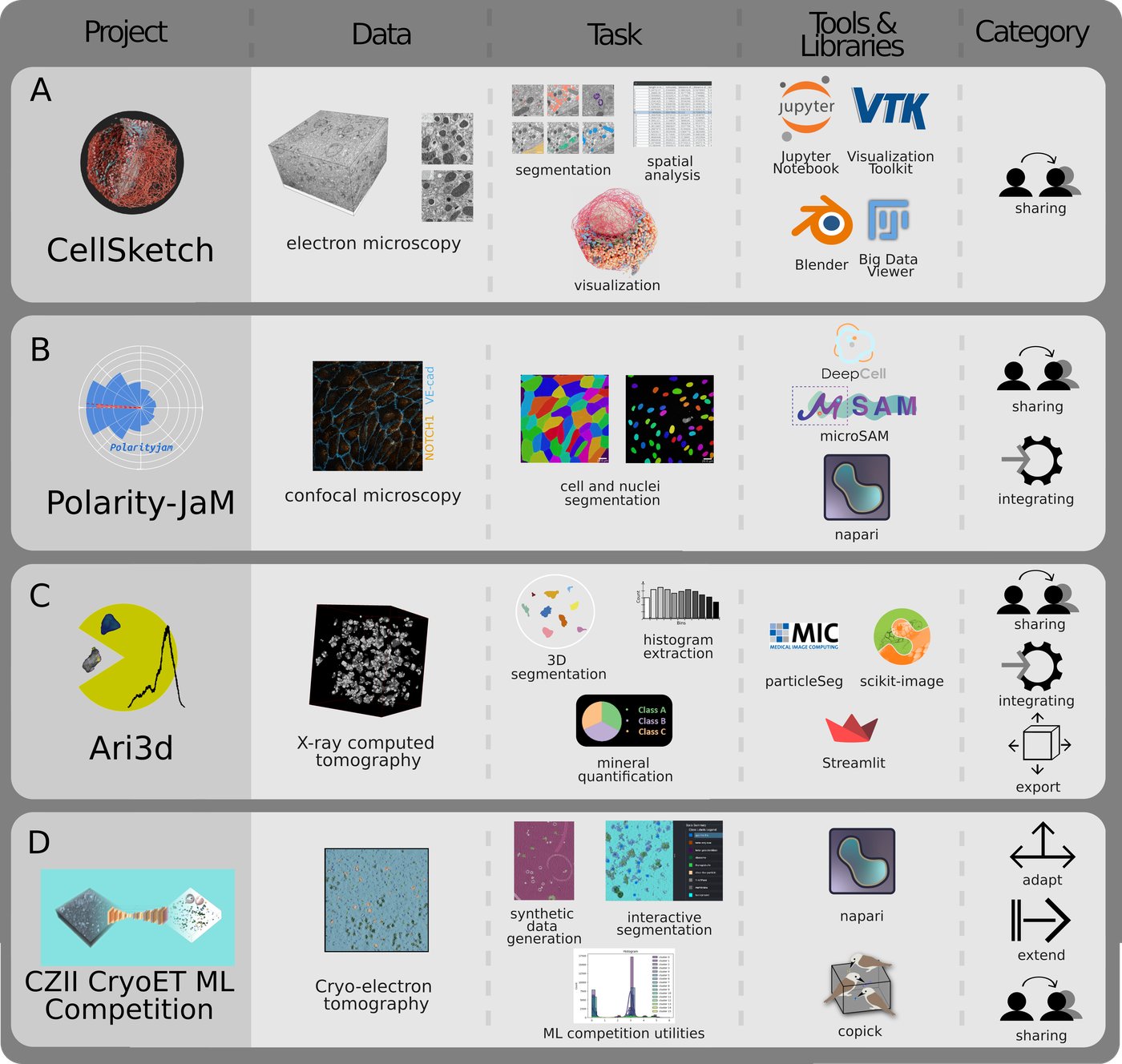
- Volume electron microscopy (see A): a protocol from raw data to 3D renderings in Blender (Nature Protocols, 2024).
- Polarity-JaM (see B): cell and nuclei segmentation with backends whose dependencies conflict (Nature Communications, 2025).
- ari3d (see C): mineral quantification in X-ray CT images, run interactively and as a Snakemake workflow on HPC (arXiv, 2025).
- CZII CryoET ML competition (see D): data generation, models and interactive tools for a Kaggle competition, shared through a catalog.
More about these projects in the case studies.
Technical concepts [optional]
How does this work? Here is the short version:
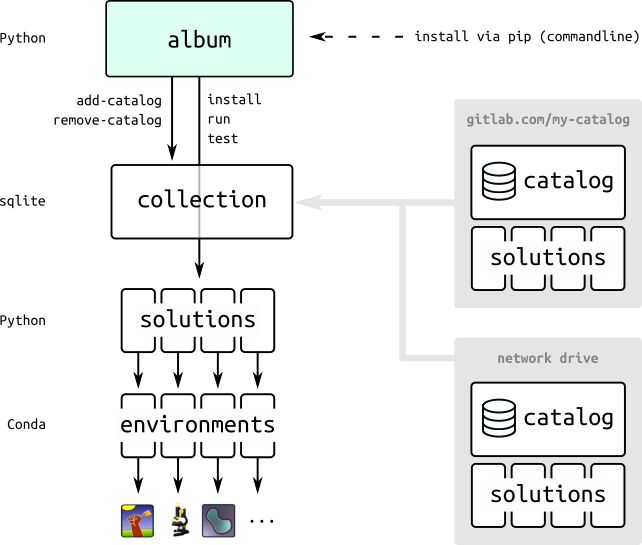
- the collection gathers all catalogs and their solutions in one place on your computer
- catalogs hold solutions; they are git repositories on GitLab, GitHub or any (network) drive
- each solution has its own environment, or reuses the environment of a parent solution
- Album runs in its own environment and starts each solution in the environment of the solution
The next pages show this hands-on: first you run a solution from a catalog, then you write your own.
Just leave a comment in the box below after signing in with GitHub. Any feedback is highly appreciated.